Choose a file
Add audio or video from your device.
Add recordings, review transcription settings, and start a private task.
Paste a public video link or upload a file.
Checking access, title, thumbnail, duration, and the playable audio track.
Files stay private. Video audio is prepared in your browser before upload.
These settings apply to every selected file.
Selected files · Try 75 minutes without sign-up. Up to 2 transcriptions sharing 75 minutes in total. This lifetime allowance never resets. Signing in keeps this same allowance, including guest usage; no extra minutes are added.
Private processingOnly prepared audio is uploaded. The original video stays on this device.
Add audio or video from your device.
Generate text, speakers and timestamps.
Edit and download the result.
Convert common audio and video formats into structured text.
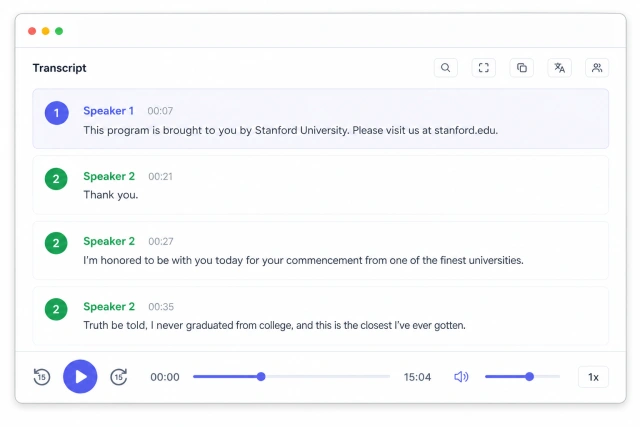
Return to the exact moment behind every segment.
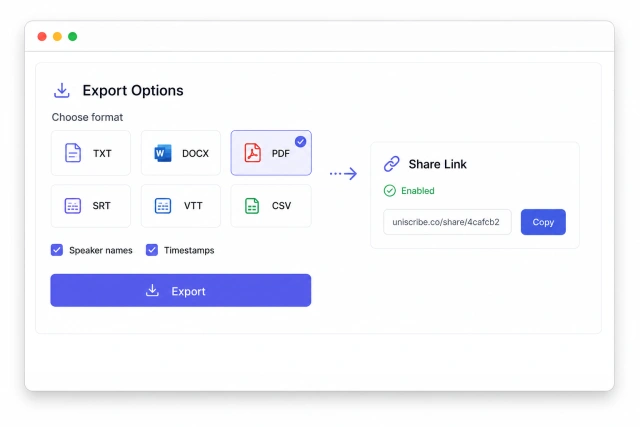
Download text, documents, data or ready-to-use subtitles.
Automatically identify one language or follow multilingual conversations in the same recording.
Review calls with their original timestamps.
Search interviews without losing context.
Export transcripts, SRT and VTT together.
Pay once for a 90-day minute pack, or choose a monthly or annual allowance. Every paid option includes unlimited uploads; only transcription minutes are deducted.
Free trial available
$0 one-time trialTry 75 minutes without sign-up.Start freeFor a short-term project without a subscription.
$12.25 one-time paymentValid for 90 daysBuy LiteFor a larger project without an ongoing commitment.
$18.90 one-time paymentValid for 90 daysBuy PlusFor regular transcription and everyday content work.
$9.50 / monthBilled monthlyChoose BasicThe best balance for creators and growing teams.
$19.00 / monthBilled monthlyChoose StandardFor high-volume production and shared workflows.
$28.50 / monthBilled monthlyChoose ProTry 75 minutes without sign-up. Up to 2 transcriptions sharing 75 minutes in total. This lifetime allowance never resets. Signing in keeps this same allowance, including guest usage; no extra minutes are added.
Audio: AAC, AMR, AWB, FLAC, M4A, MKA, MP2, MP3, OGA, OGG, OPUS, WAV, WEBA, WEBM and WMA. Video: 3GP, MKV, MOV, MP4, MPG, TS, WEBM and WMV.
Try 75 minutes without sign-up. Up to 2 transcriptions sharing 75 minutes in total. This lifetime allowance never resets. Signing in keeps this same allowance, including guest usage; no extra minutes are added. · Up to 6 GB · supported video is converted to an audio track in your browser. The original video is not uploaded.
Yes. Export as TXT, Markdown, DOCX, PDF, CSV, TSV or JSON, or download timestamped subtitles in SRT and VTT formats. Available options vary by format.
Media2Text supports transcription languages with automatic language identification, including English, Chinese, Spanish, French, German, Japanese, Korean, Arabic, Hindi, Portuguese and many more.
Results are usually ready within minutes, depending on file length.
Yes. Lite includes 315 minutes for $12.25 and Plus includes 630 minutes for $18.90. Both are one-time purchases valid for 90 days and can coexist with a subscription.
Media2Text extracts the audio track from video inside your browser. The original video is never uploaded. Prepared audio is retained only according to the published transcription retention policy.